Class Diagrams
Overview
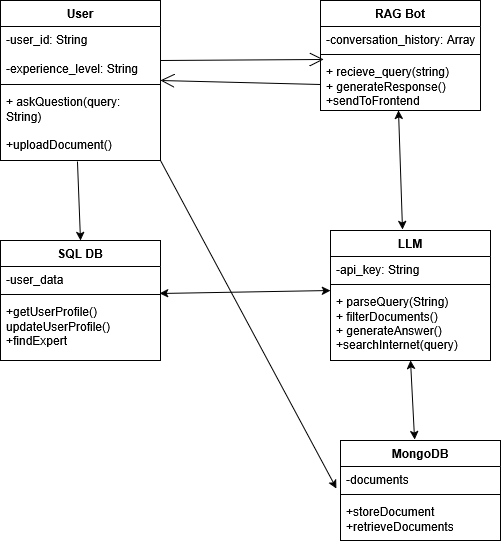
The class diagram shows the main components and their interactions in Project Keystone. The system is composed of User, RAG Bot, SQL_DB, LLM, and MongoDB.
Component Descriptions
User
The person interacting with the system. Attributes:
-user_id: String- Unique identifier for the user-experience_level: String- User's expertise level
Methods:
+askQuestion(query: String)- Submits a question to the bot+uploadDocument()- Uploads new files to the system
RAG Bot
Receives queries from users and orchestrates the response generation.
Attributes:
-conversation_history: Array- Maintains context across interactions
Methods:
+recieve_query(string)- Accepts the user's question+generateResponse()- Creates answer using retrieved documents and LLM+sendToFrontend- Delivers formatted response back to user
LLM (Large Language Model)
Generates natural language responses based on retrieved documents.
Attributes:
-api_key: String- Authentication for LLM API
Methods:
+parseQuery(String)- Understands the user's intent+filterDocuments()- Identifies relevant information from retrieved docs+generateAnswer()- Creates context-aware responses+searchInternet(query)- Searches external sources if internal docs insufficient
MongoDB
Stores documents, files, and their content for retrieval.
Technology: MongoDB
Attributes:
-documents: Collection- Uploaded files and documentation
Methods:
+storeDocument- Adds new documents to the database+retrieveDocuments- Fetches relevant documents based on query
SQL_DB
Stores user profile information and interaction history.
Technology: PostgreSQL/MySQL
Attributes:
-user_data: Table- User profiles and experience levels
Methods:
+getUserProfile()- Retrieves user information+updateUserProfile()- Tracks interactions and learning progress+findExpert- Suggests team members with specific expertise
Key System Features
-
Query Processing
-
Document Retrieval
-
Response Generation
-
User Profile Management
-
Expert Matching
-
Fallback Search
-
Conversation Context